Hi! My name is Pawel, and this is an introduction to myself. Where do I even start? Well, I like to say that I'm a full-time nerd, part-time psychonaut. I love video games like World of Warcraft (which I've previously written about) as well as tabletop RPG's like Dungeons & Dragons. I also like philosophy and fantasy books like the Stormlight Archive series (it's great, go read it). I'm a second year Creative Digital Media student at TUD Blanchardstown. I picked this course because it covers a wide range of topics, from photography, through web development to game development, and I'm not exactly sure what I want to do once I'm finished here. Why a future revolutionary? I believe that the government is a bad thing full of corrupt people and that we should disestablish it. Why is stealing food from a shop illegal but keeping a warehouse full of it while people starve perfectly fine in the eyes of the law? Anyway, I'm not gonna dw...
My adventure with Unity3D begins with a video by Jimmy Vegas on Youtube. The first video showed me how to open and setup Unity, told us about the programming languages we'll be using, namely C#, about how to create and manipulate simple 3D object, as well as a terrain creation. The second video told us how to put texture on a terrain, how to raise and lower terrain and add a normal map. A normal map is a trick that computers use to make flat terrain seem bumpy by adding fake shadows to the texture. We were also shown how to add texture to objects and change their properties. In the third part, we were told more about C# and the scripts in unity. We learned how to add trees and grass and how to make them sway in the wind and change their colours. The video also shows how to add a player character, and demo the game (walk around in it, etc). Next we were shown how to add a gem (a custom 3D object), and how to add a script from Visual Studio to make the gem rotate. ...
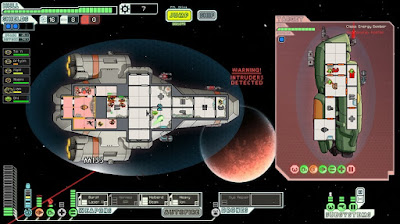
Let's get down to making a game, shall we? First we need to come up with several ideas. My first idea is an RPG set in space, inspired by games like EVE online, FTL: Faster Than Light and Mass Effect. The goal of the game is to reach the centre of the galaxy. The closer one gets to the centre the more hostile the conditions are. The player controls a spaceship, which can be upgraded or swapped out. The ships will have various stats like endurance, speed, damage etc. which will be modified by new equipment. I imagine the gameplay would take place on a mostly flat, invisible plane, rather than fully 3D (navigating in 3D space can be very confusing). The enemies could be any of the following: space pirates, corrupt governments/police, huge space monsters, natural phenomena (black holes, supernovae etc). EVE Online gameplay trailer (2019) This screenshot is from FTL, which is a 2D game but we could make it appear 3D if we put the player in 3rd person perspective and put them ...


Comments
Post a Comment